Users and access in Xena
How your user profile works, and how to invite colleagues into your companies.
Your personal user profile
When you register in Xena, you get your own personal Xena profile, linked to your unique email address.
It is important to understand this, as some people mistakenly create a company user. This can create confusion, since a company can have several users, and you, as a user, can also have access to several different companies.
So, register as yourself – it makes sense!
Once you have created your user in Xena, you can create your companies
Your Xena profile can also be invited into someone else's company.
You can also choose to invite other users into your companies.
➡️ Read more: Login via Google or Facebook
Invite other users
Open the menu Setup > Company > Users. Here you will find a list of the people who already have access to your company, and this is also where you can invite new users.
⚠️ Note: Only users with the Administrator role can invite new users.
Press the Invite user button
Enter the user's email address
Select a role for the new user
Select the apps the user should have access to
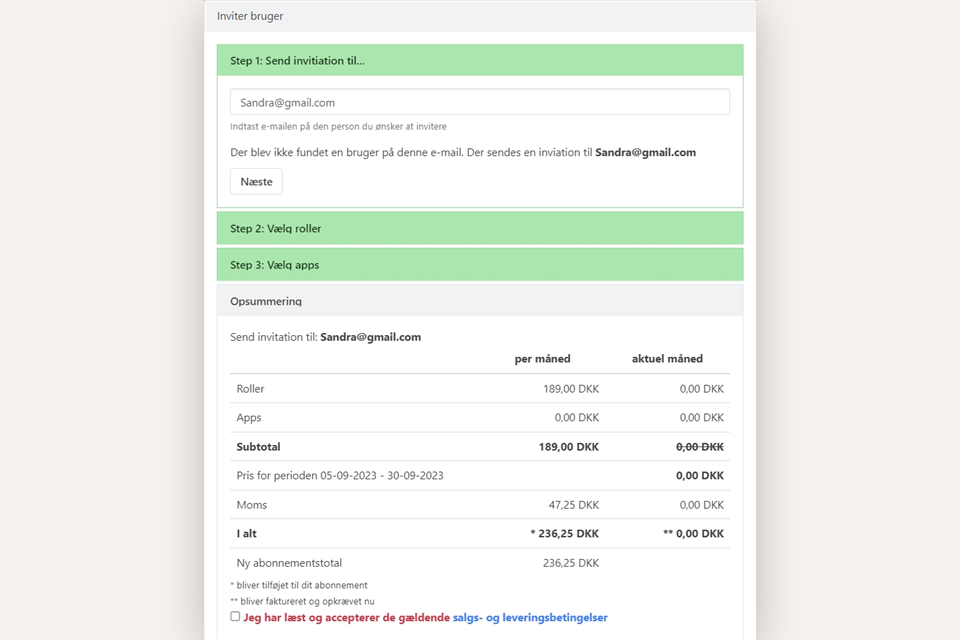
Finally, you will get a summary and the price for your choices. Press the Invite button
The users you invite do not need to have an existing Xena profile. The email address is the key to access.
⚠️ Note: If you haven't received the activation email, first check your junk/spam folder. If it still isn't there, contact Xena support to have it resent.
For example, if Sandra does not have a Xena profile, she will receive an email with a link to create a Xena profile. Once this profile is created, Sandra will have immediate access to your company.
Transfer ownership
If you need to transfer ownership of your user in a company to another user, you can do so using this function. This means that the new user takes over the previous user's active subscription, without you having to pay for both users in that month.
You will find the function for transferring ownership in the menu (the three dots) next to your user in the user overview.
Note that no data is transferred from one user to the other, so if you want to retain historical data linked to the old user, you must downgrade them to a free role. Read more about downgrading a user in this guide.
Can't I just share my login with others?
Although you can share your login with others, it is not advisable. Your login details grant access to information and functions that others should not have access to. In Xena, you can create multiple companies, and each will have its own purpose. The same applies to external companies that others have given you access to, which should not be accessible to third parties.
In addition, Xena allows linking of email and Dropbox, which you probably do not want to share with others. Last but not least, your login only allows one user to access Xena at a time, for security reasons.
- Updated