Password and security
See the password requirements, how to change or reset it, and how to enable two-factor
Password requirements
Your password must meet certain requirements to ensure it is sufficiently strong:
Minimum six characters
At least one letter and one number
At least one capital letter
Must not contain certain special characters
Must not contain the same character four times in a row
Must not start or end with a blank character
Must not contain your CPR number (Danish civil registration number)
When you create your password, the system will guide you in meeting these requirements.
To make your password even more secure, you can consider the following:
Choose a password of at least eight characters.
Include allowed special characters from the list: { } ! # " $ ' % ^ & , * ( ) _ + - = : ; ? . and @.
Avoid including personal information, such as family names.
Remember that although a complex password is important for security, it should still be easy to remember, so you do not have to write it down.
Change password
If you want to change your password, you can follow these steps:
Log in to Xena
Press the profile icon in the top right corner.
Select My profile in the drop-down menu
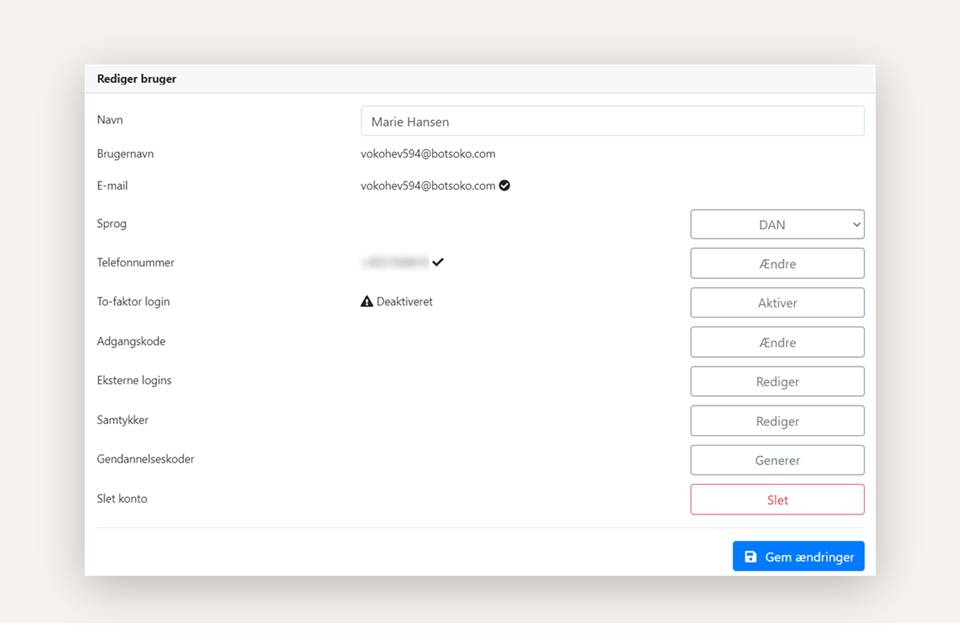
Once your profile is open, press the Change button next to the Password item
Forgot password
If you have forgotten your password, you can easily reset it yourself from the login screen.
Click Forgot password on the login screen.
Enter your email address.
Check your inbox – you will receive an email with a link where you can reset your password.
Two-factor authentication
In Xena, you can enable two-factor authentication by receiving one-time SMS codes on your mobile phone every time you log in. This is an effective way to increase security. You must have access to your mobile phone to log in with your user credentials.
If you want to change your password or enable two-factor authentication, you can see the guide Language and personal settings.
- Updated